Thursday, 6 February 2014

Digital Graphics Pt.2

Digital Graphics
Pt.2

Image Optimisation

  These are different options that can be use to maximise the output of the image, through the editing of it's features.

Optimising your image
   There are many different ways you can optimise your image, if you want your image to display on a certain screen or format then you must first make sure that the quality of the image suits that of the display or else it can have disastrous effects on the out come of your image.
Bit-Depths effects

  This can be done by editing the bit depth which edits how many bits make a pixel for better colours/shades, increasing the resolution to a higher amount, which is measured in PPI (pixels per inch higher>less grainy), making sure that the image is actually to scale with the display (although this can have a negative effect on raster files, making them grainier/pix-elated).

JPEG File

   Sometimes you may want to store your image on a computer for later use, this is where file size is important as some files may take up too much room so you may need to optimise them for storage.
If you wish to decrease the amount of memory your image takes up, you can change the file name extension to one of which reduces the images size such as .JPEG or .PNG.
   They give you the option to compress the image in either of the two forms, lossy and lossless the former remove unnecessary information such as alpha channels and layers, while the latter leaves the image close to the original while changing small details to save space.

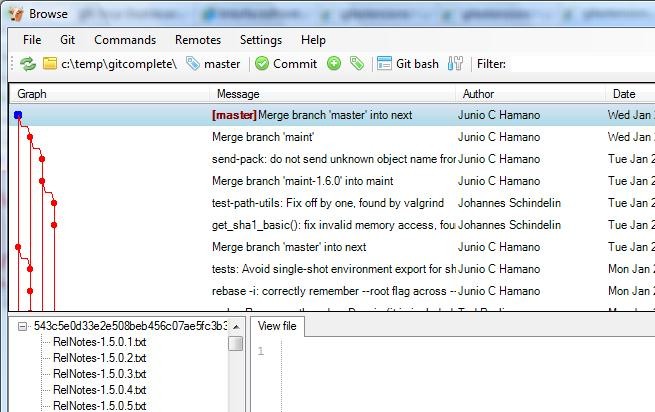
GIT

Asset management software is used to organise and store the different assets used, before recording any data related to the file in question, whether it be their names, their format, when they were changed and who changed them, all this information is stored categorically to be seen at your convenience. This is very useful for artists as they can find their assets, import them and save the final product in any file format that they choose with little to no hassle involved on their part.

Digital images Pt.1

Digital images
Pt.1

Being able to capture images digitally has provided people with various new ways to produce, edit and showcase their work but how does one actually capture an image digitally well there 3 methods of which I know of: 


  1. Scanners- Machines that take high quality images of documents presented upon its surface. You can get them in different forms: 
Flatbed

This is the most commonly found type of scanner, you have to place the paper between the window and it's back-light, which illuminates the picture, the scanner then moves around and picks up the light going through the document/picture. This light passes through lenses to hit the light sensitive diodes that modify the light into an electric current according to intensity. The voltage is stored as data and then it is transferred to a PC where it is translated into a digital image. They can be used to scan pretty much anything, they are fast at scanning and are generally good at picking up details in graphics(photos) and documents. Although they can only can one image at a time and generally cost a considerable amount for what you are solely getting (£100-£500).

Handheld Scanner
Handheld scanners project a light onto the object to illuminate the image and then the an angled mirror reflects the light onto a lens that focuses the images onto light detectors located on a CCD that then detects changes in the intensity that also changes in voltage(as they are powering the panels), these changes are then picked up and translated into a readable format for the software. While this type of scanner is cheap (costing around £30-£70), light and portable it doesn't have a very good quality and since you must move it over the image there is the factor of human error where you may go to fast or not be precise enough.

Sheet-fed scanners
As the name implies when using this type of scanner you have to feed the paper through the scanner, other than in this aspect the sheet-fed scanner is fairly similar to the flat-bed scanner. This is however more compact and portable while being able to scan more sheets in a period of time than it's flat-bed cousin although the cost for doing so is a decrease in quality since it is scanning a moving image and it is unable to scan objects such as books. (£100-£300)

All-in-One

If you have multiple tasks to do then this scanner is most probably the most compact and cost efficient scanner you can get at about £40-£100. It is not only a scanner but also a fax machine and a printer. As I have already stated, this machine is good at saving space, money and time as you don't have work multiple machines in order to print or fax your work should you want to once you have finished with the document.
Just don't expect the quality of a flat-bed, the portability of a sheet-fed or the price of a handheld.


 The key feature of scanners is the ability to process documents and photographs into a digital image, with great detail.
 2.  Camera- a device for recording visual images in the form of photographs,movie film or video signals.

These cameras use a grid of photo sensors to capture the light, which it hits, sending an electric current from each of the individual sensors on a CCD. As the light hits the different sensors with varying amounts of intensity/brightness they produce different electrical charges that are picked by firmware that translates it into a format readable by graphic programs.

There are 3 different types of digital camera:

Compact
Here we have the common compact camera unlike it's higher bred sibling the SLR, it is made for the purpose of family photos or essentially beginners to the photo hobby. Due to this it has been altered to fit this purpose by being more simple and cheap. They are used for taking memorable images of holidays, parties and other events. It is very cheap compared to its SLI counter-part while having a higher megapixel rate than their camera phone relation, a middle grounds of sorts, although they neither have the quality or  the settings found on an SLI or the effeciency of a phone camera.


SLI
Here we have the SLI camera the, alpha male of the camera clan, it is handled only by the highest class of photographer, those who wish to perfect their craft and more importantly those who wish to make there hobby into their job. Because these are the top in their field it is adequate that they have high mega-pixel sensors, along with high quality screens and HDMI output to boot. Since they are so valuable they also have to be very rugged being made out of steel to withstand all the tasks they must handle. This does mean however that the camera is very expensive leading into the range of the £1000s and to get the most out of it you will have to purchase all the additional equipment such as lenses and stands.

Camera Phone
As you can most probably tell by looking at the name, this is a camera that has been integrated with a phone. It is usually used for more menial tasks such as scanning QR codes, taking a quick picture of something interesting on the go and sharing said image to other people over messages or social networking sites.
These cameras have to be light as the phone itself must be portable for convenience, so that means that the lenses are usually small and the actual quality of the images are low due to it's low mega-pixel rate. However being able to share images over the internet or messages is a big plus for this camera if you like travelling.

The key feature for cameras are that they are able to produce a digital image without having to scan from a source they can create an image from scratch, they also very portable when compared to other forms of digital capture.

  3. Graphics Tablets- An input device composed of a flat, pressure sensitive surface  and a stylus, that is mainly used for drawing as it allows for greater accuracy than a mouse. There are two main types of graphics tablet the surface and the screen, the difference between the two being that the latter displays the image on the surface on which you draw to better emulate real drawing, while the former simply displays the image on the computer monitor. Higher-end tablets tend to have higher pressure sensitivity that detects how hard you are pressing, than some of the lower end/older tablets, with range going from 512(amateur use) to 2,048 levels of pressure sensitivity for not only the cursor but also the eraser should be included.
Surface
Cheaper end, 1024 pressure levels, active area of 152x95 mm 
but displays the image on computer monitor and does not have multi-touch
Wacom Intuos Pen CTL-480s-enes graphics tablet :£49.99 - £59.99

Screen

Has 2048 levels of pressure sensitivity, comes with multi-touch & 
displays the image on the screen ( 54.6 cm) as you draw
but costs a lot of money.
(This one, Wacom Cintiq 22HD Touch - 16-btn Digitiser - Wired - USB: £1,757)


Wednesday, 13 November 2013

File Format + Types

                  File formats and types
A pixel is a square full of colour used in raster images.
The resolution of an image is determined by the amount of pixels there are in a set area, DPI (which stand for dots per inch) measures this, the higher the DPI the better the resolution.
The colour intensity of a pixel show how much of a certain colour is shown in the pixel, in comparison to the other colours.
The colour intensity is commonly stored in either a RGB or CMYK format. RGB, is a channel containing the colours red, green and blue. RGB also contains alpha, a channel that shows transparency in a picture, RGB is for storing images digitally. CMYK has the following channels of Cyan, Magenta, Yellow and black. CYMK is mainly used for images you wish to print off.

Compression reduces the files size, it does this by compacting all the information and removing what isn’t needed. Compression is very useful as it allows you save up space on your computer, compressed files are also quicker to send via the internet.

A lossy compression removes any unused data from the file which reduces its size. This also means the images lose quality when zoomed in onto.

A lossless compression technique allows you to keep the quality of the image as the extra data about the image such as layers, is kept. This also means you will be left with a much larger file than a lossy compressed file.
Raster Images pixelate when zoomed in on, as they use these coloured squares to produce the image.
Vestors however do not, as they use co-ordinates to plot the shape, although they have a more limited colour palette.


A raster image uses pixels it generally is used images in which you do not want to zoom in on but you can use a wider range of colours than a vector image.

  • BMP- these files were used in old video games as they didn’t require de-compression saving the consoles processing power to be used for more important things, this also meant the files were very big.
  • GIF- these files were originally the common image file on the internet, they are small, allow for animations and use lossless compression. However they only have 256 colours maximum so they aren’t very good for photos.Used online for non-photos and small animation loops.
  • TIFF- these files are large files stored in a lossless format with all the data intact. Because of the size it isn’t advised to keep many although they are good for high quality pictures. Used for final design. Very good for editing photos.
  • JPG- Widely used format for storing images on the web, with enough colours to be sufficent for coloured photos while being smaller than a PNG file as it has no transparency due to the lossy compression. Not very high quality, do not use for photos.


Vestor images use mathematics to make shapes by plotting out the shape with vectors. Because of this you are able to scale the images without them getting pixelated. You are unable however, to produce many details/gradients with the limited colour pallet. 

  • PSD- Raster file created by photoshop, it uses a lossless compression format and can save layers, transparency and masks. This means the files are moderatly large, so they are usually used as the source file to be edited, rather than the final design. Is it supported by many other programs other than Adobe programs.
  • FLA- Flash animation file, used by adobe. Reduces large graphic files into a smaller file that is better for sharing on the web. Can be used for animation, videos and games like on the website newgrounds.com. Websites with flash generally load slower than those without.

  • ai- Adobe Illustrator Artwork, uses unflattened images in a vector format. Editable in Coreldraw, Inkscape and Illustrator it is mainly used for printable media. It saves in a lossless format. As it is a vector image it can be zoomed in indefinitly without it pixelating. Newer versions may have compatability issues.

Thursday, 7 November 2013

Computer Game Graphic Types

Digital graphics play an important part in the creation of video-games. They are used to create in-game content like menus and sprites as well as promoting the sales of the game through cover art and posters. I’m going to list some of it uses and try to explain them.

 2D Sprites
A 2D sprite is a flat image of an object or a character.
 A group of them are used in sequence in order to produce movement.
 The more sprites in an action, the more frames required resulting in a more fluid
 and realistic movement


3D Isometric Sprites                          
An isometric sprite is a model made in a 3D program that is then rendered on a 2D plain. They are used to make the look of a 3D object without the system requirements of having 3D objects rendered.

Concept art                                
Concept art uses ideas from the game designers to make some rough sketches in order to display how the different game elements would work
together. Enviromental concepts give an idea of
the in-game landscape, character concepts show how different npcs would look and interact with the player.Vehicle concept shows how the cars and trains in-game would look in the setting. Weapons concepts show different weapons, these weapons are then worked upon remove and adding different features.


Textures
Textures form the details on a model, this means the system doesn't have to render as many polygons.There a few different texture types the first is  the bump map, high intensity areas are represented by white and low intensity areas are represented by black. Grey represents normal areas. Normal Maps are rainbow coloured grids of mainly blue. It's mainly used in the production high resolution models, where developers then bake the geometry onto a low poly-count model to save polygons.

Specular maps are used to show an objects shininess, the higher the the value of the pixel the shinier the object becomes. Textures like cotton will have a dark specular map while marble would have a high specular map. Diffuse maps use textures to define the objects main colour.


 Game Interface                         
The game interface of game range from the heads-up display in-game, the text, the menus to the menu backgrounds.Interfaces are mainly 2D with a few exceptions, the HUD must be visible without taking up the whole screen, the text needs to be large enough to read and the menu need to indicate which option you are selecting.


Printed Media
Different types of printed media are distributed during the end of production and start of selling period of a game, they can be in the form of posters, box-art and cases as well as the image on the disc.Most of which is used to promote and advertise the game, in order to gain more sales.

Thursday, 24 October 2013

Graphics Styles


Graphic Styles

    The graphic style of a game decides the art style of the textures and assets used. Graphic styles vary from hyper-realistic to really wacky cartoon textures in order to help mould a general idea of what the game is going to be like.


Photo-realistic


  The photo-realism graphic-style is the closest to real life as you get in the video game world. It uses photos of the real world as a reference for the texture in game. Games that use this graphic style consist of: Battlefield 3, Crysis 2 and Beyond Two Souls. This style makes the game more immersive as it looks closer to real life.


Abstraction


 The abstract graphic style has shapes and objects that look the most unrealistic. It is usually very cartoony, having bright colours and shapes that vaguely relates to characters and objects. Many of Jackson Pollock’s paintings use this style. In the games market it is usually used in games aimed at a younger audience as it is very colourful and bright. Examples would be Loco Roco and Limbo.


Cel Shading

Cel-shading is similar to abstract although it is usually more realistic. A key feature of cel-shading is the bold, black border around objects. This makes the textures within the border stand out more. Games that use this style are: Borderlands, Team fortress 2 and Cel damage overdrive.


Exaggeration

Some games have an exaggerated graphic style, this means that some aspects of the characters are disproportionate such as the eyes and arms, much like caricatures.  Most JRPG’s such as Tales of symphonia use it, having giant eyes. Gears of war also has exaggerated graphics with the characters having giant feet and torsos. These giant proportions can make a character look really strong or cute.